PHPUnit によるインメモリ HTTP テスト
Slim\App は PSR-15 の RequestHandlerInterface(public function handle(ServerRequestInterface $request): ResponseInterface)を直接実装しています。そのため、Web サーバーを起動したり TCP ソケットを開いたりすることなく、ErrorMiddleware・BodyParsingMiddleware・RoutingMiddleware・JwtAuthenticationMiddleware・FastRoute パラメータ抽出・Single-Action Controller を含む HTTP パイプライン全体を PHPUnit のプロセス内(インメモリ)で 1 ミリ秒未満で一気通貫テストできます。
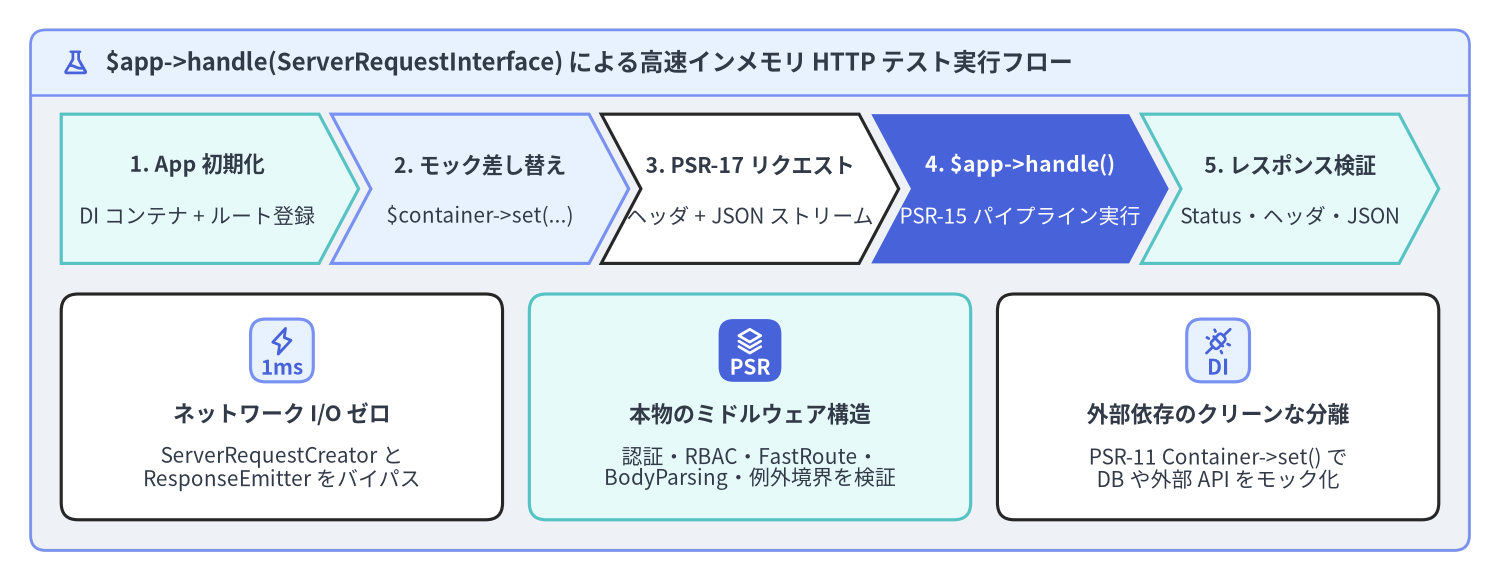
Source Code
from drawlib.canvas import save, setup
from drawlib.icons import phosphor
from drawlib.shapes import rectangle
from drawlib.smartarts import CardList, ChevronProcess, Panel
from drawlib.styles import Styles
from drawlib.text import text

setup(width=196, height=76, dpi=150)

outer = Panel(
    "$app->handle(ServerRequestInterface) による高速インメモリ HTTP テスト実行フロー",
    style=Styles.Neutral.patch(shape_r=2.0),
    header_style=Styles.PrimaryNeutral.patch(shape_line_width=1.2),
    text_style=Styles.DarkBold.patch(text_size=11.5),
    icon=phosphor.flask,
    icon_style=Styles.PrimaryBold,
    header_variant="filled",
    header_height=8.5,
)
outer.draw((4.0, 4.0), width=188.0, height=68.0)

proc = ChevronProcess(
    style=Styles.White,
    text_style=Styles.DarkBold.patch(text_size=10.2),
    description_style=Styles.Dark.patch(text_size=10.0),
    corner_angle=62.0,
    spacing=1.6,
    flat_left_end=True,
)
proc.add(
    "1. App 初期化",
    description="DI コンテナ + ルート登録",
    style=Styles.SecondaryNeutral,
)
proc.add(
    "2. モック差し替え",
    description="$container->set(...)",
    style=Styles.PrimaryNeutral,
)
proc.add(
    "3. PSR-17 リクエスト",
    description="ヘッダ + JSON ストリーム",
    style=Styles.White,
)
proc.add(
    "4. $app->handle()",
    description="PSR-15 パイプライン実行",
    style=Styles.PrimaryFlat,
    text_style=Styles.WhiteBold.patch(text_size=10.2),
    description_style=Styles.White.patch(text_size=10.0),
)
proc.add(
    "5. レスポンス検証",
    description="Status・ヘッダ・JSON",
    style=Styles.SecondaryNeutral,
)
proc.draw(xy=(8.0, 41.5), width=180.0, height=19.5)

cards = CardList(
    style=Styles.White,
    text_style=Styles.DarkBold.patch(text_size=10.5),
    description_style=Styles.Dark.patch(text_size=10.0),
    badge_shape="rounded_rect",
    badge_style=Styles.PrimaryNeutral,
    badge_text_style=Styles.PrimaryBold.patch(text_size=10.0),
    icon_style=Styles.PrimaryBold,
    direction="horizontal",
    spacing=3.5,
)
cards.add(
    "ネットワーク I/O ゼロ",
    "ServerRequestCreator と\nResponseEmitter をバイパス",
    badge_text="1ms",
    icon=phosphor.lightning,
)
cards.add(
    "本物のミドルウェア構造",
    "認証・RBAC・FastRoute・\nBodyParsing・例外境界を検証",
    badge_text="PSR",
    icon=phosphor.stack,
    style=Styles.SecondaryNeutral,
    badge_style=Styles.PrimaryFlat,
    badge_text_style=Styles.WhiteBold.patch(text_size=10.0),
    icon_style=Styles.WhiteBold,
)
cards.add(
    "外部依存のクリーンな分離",
    "PSR-11 Container->set() で\nDB や外部 API をモック化",
    badge_text="DI",
    icon=phosphor.plugs_connected,
)
cards.draw(xy=(8.0, 8.0), width=180.0, height=29.5)

save()
Slim 4 がミリ秒未満のインメモリ HTTP テストに強い理由
$_SERVER や $_POST、php://input をコントローラ内で直接参照したり、header() や echo を直接呼び出したりする従来の設計では、HTTP エンドポイントのテストにプロセス分離や Web サーバーの起動が不可欠でした。これに対し Slim 4 は、PHP グローバル入出力アダプタ($app->run())と 純粋な PSR-7 / PSR-15 リクエスト処理($app->handle($request))を明確に分離しています。
| 実行メソッド | 入力データソース | 実行されるパイプライン | 出力先 | 主な用途 |
|---|---|---|---|---|
$app->run() |
ServerRequestCreatorFactory が $_SERVER, $_GET, $_POST, $_COOKIE, $_FILES から生成 |
MiddlewareDispatcher -> RouteRunner -> Route |
ResponseEmitter::emit() が header() と echo でクライアントへ送出 |
本番 PHP-FPM 環境のフロントコントローラ(public/index.php) |
$app->handle($request) |
PSR-17 ファクトリで構築した任意の PSR-7 ServerRequestInterface |
まったく同じ MiddlewareDispatcher -> RouteRunner -> Route |
イミュータブルな PSR-7 ResponseInterface を呼び出し元へ直接返却 |
PHPUnit インメモリ統合テスト、および常駐ワーカー(RoadRunner / FrankenPHP) |
Slim 4 アプリケーションのテストピラミッド
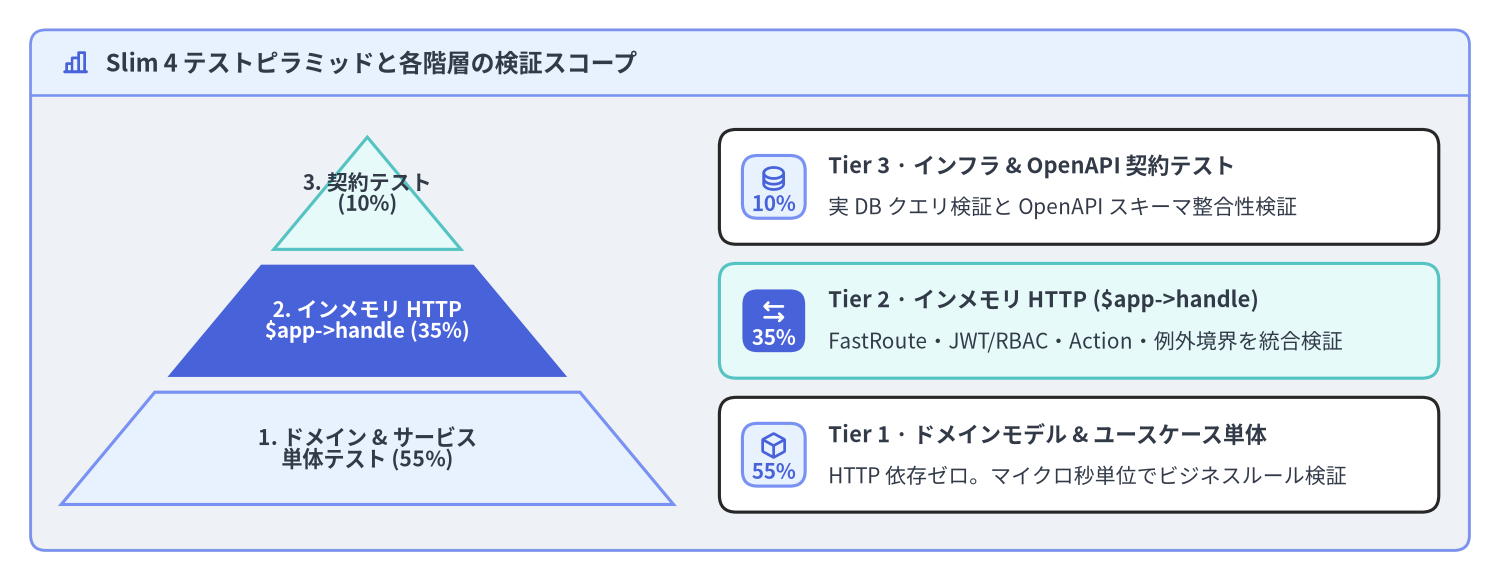
保守性の高い Slim 4 プロジェクトでは、以下の 3 層のテストピラミッドを組み合わせることで、ビジネスロジック・HTTP パイプライン・外部インフラ連携を高速かつ網羅的に検証します。
Source Code
from drawlib.canvas import save, setup
from drawlib.icons import phosphor
from drawlib.smartarts import CardList, Panel, Pyramid
from drawlib.styles import Styles

setup(width=196, height=76, dpi=150)

outer = Panel(
    "Slim 4 テストピラミッドと各階層の検証スコープ",
    style=Styles.Neutral.patch(shape_r=2.0),
    header_style=Styles.PrimaryNeutral.patch(shape_line_width=1.2),
    text_style=Styles.DarkBold.patch(text_size=11.5),
    icon=phosphor.chart_bar,
    icon_style=Styles.PrimaryBold,
    header_variant="filled",
    header_height=8.5,
)
outer.draw((4.0, 4.0), width=188.0, height=68.0)

pyr = Pyramid(
    style=Styles.Neutral,
    text_style=Styles.DarkBold.patch(text_size=10.2),
)
pyr.add(
    "3. 契約テスト\n(10%)",
    style=Styles.SecondaryNeutral,
    text_style=Styles.DarkBold.patch(text_size=10.0),
)
pyr.add(
    "2. インメモリ HTTP\n$app->handle (35%)",
    style=Styles.PrimaryFlat,
    text_style=Styles.WhiteBold.patch(text_size=10.0),
)
pyr.add(
    "1. ドメイン & サービス\n単体テスト (55%)",
    style=Styles.PrimaryNeutral,
    text_style=Styles.DarkBold.patch(text_size=10.2),
)
pyr.draw(
    xy=(8.0, 10.0),
    width=80.0,
    height=48.0,
    margin=2.0,
    direction="bottom",
    order="vertex_to_base",
)

details = CardList(
    style=Styles.White,
    text_style=Styles.DarkBold.patch(text_size=10.5),
    description_style=Styles.Dark.patch(text_size=10.0),
    badge_shape="rounded_rect",
    badge_style=Styles.PrimaryNeutral,
    badge_text_style=Styles.PrimaryBold.patch(text_size=10.0),
    icon_style=Styles.PrimaryBold,
    direction="vertical",
    spacing=2.5,
)
details.add(
    "Tier 3 · インフラ & OpenAPI 契約テスト",
    "実 DB クエリ検証と OpenAPI スキーマ整合性検証",
    badge_text="10%",
    icon=phosphor.database,
)
details.add(
    "Tier 2 · インメモリ HTTP ($app->handle)",
    "FastRoute・JWT/RBAC・Action・例外境界を統合検証",
    badge_text="35%",
    icon=phosphor.arrows_left_right,
    style=Styles.SecondaryNeutral,
    badge_style=Styles.PrimaryFlat,
    badge_text_style=Styles.WhiteBold.patch(text_size=10.0),
    icon_style=Styles.WhiteBold,
)
details.add(
    "Tier 1 · ドメインモデル & ユースケース単体",
    "HTTP 依存ゼロ。マイクロ秒単位でビジネスルール検証",
    badge_text="55%",
    icon=phosphor.cube,
)
details.draw(xy=(94.0, 9.0), width=94.0, height=50.0)

save()
- Tier 1 — ドメイン単体テスト(
55%): Slim や DI コンテナを起動せず、ドメインエンティティ・値オブジェクト・ユースケースクラスを直接インスタンス化して検証します。 - Tier 2 — インメモリ HTTP パイプラインテスト(
35%): 本番と同じルート定義とミドルウェア構成でAppを生成し、PSR-11 コンテナ内の外部リポジトリや認証アダプタだけをモックに差し替えて$response = $app->handle($request)を実行します。 - Tier 3 — インフラ & 契約テスト(
10%): テスト用 DB トランザクションに対する SQL クエリ検証や、OpenAPI 3.1 スキーマとの整合性チェックを行います。
再利用可能な AppTestTrait による PSR-7 リクエスト生成と検証
テストケースごとに新鮮な App と Container を構築し、PSR-17 の ServerRequestFactoryInterface と StreamFactoryInterface を使ってリクエストを生成する AppTestTrait を用意しておくと、すべての HTTP テストを簡潔に記述できます。
<?php

declare(strict_types=1);

namespace Tests\Support;

use DI\Container;
use DI\ContainerBuilder;
use Psr\Http\Message\ResponseInterface;
use Psr\Http\Message\ServerRequestFactoryInterface;
use Psr\Http\Message\ServerRequestInterface;
use Psr\Http\Message\StreamFactoryInterface;
use Slim\App;
use Slim\Factory\AppFactory;

trait AppTestTrait
{
    protected Container $container;

    /** @var App<Container> */
    protected App $app;

    protected function setUpApp(): void
    {
        $builder = new ContainerBuilder();
        (require __DIR__ . '/../../config/dependencies.php')($builder);

        $this->container = $builder->build();
        $this->app = AppFactory::createFromContainer($this->container);

        (require __DIR__ . '/../../config/middleware.php')($this->app);
        (require __DIR__ . '/../../config/routes.php')($this->app);
    }

    /**
     * @param array<string, string> $headers
     * @param array<string, mixed>  $queryParams
     * @param array<string, string> $cookies
     */
    protected function createRequest(
        string $method,
        string $path,
        array $headers = ['Accept' => 'application/json'],
        array $queryParams = [],
        array $cookies = []
    ): ServerRequestInterface {
        /** @var ServerRequestFactoryInterface $requestFactory */
        $requestFactory = $this->container->get(ServerRequestFactoryInterface::class);
        $request = $requestFactory
            ->createServerRequest($method, $path)
            ->withQueryParams($queryParams)
            ->withCookieParams($cookies);

        foreach ($headers as $name => $value) {
            $request = $request->withHeader($name, $value);
        }

        return $request;
    }

    /**
     * @param array<string, mixed>  $payload
     * @param array<string, string> $headers
     */
    protected function createJsonRequest(
        string $method,
        string $path,
        array $payload,
        array $headers = []
    ): ServerRequestInterface {
        /** @var StreamFactoryInterface $streamFactory */
        $streamFactory = $this->container->get(StreamFactoryInterface::class);
        $json = json_encode($payload, JSON_THROW_ON_ERROR);

        $request = $this->createRequest(
            $method,
            $path,
            array_merge(
                [
                    'Accept' => 'application/json',
                    'Content-Type' => 'application/json',
                ],
                $headers
            )
        );

        return $request->withBody($streamFactory->createStream($json));
    }

    /**
     * @return array<string, mixed>
     */
    protected function assertJsonResponse(
        ResponseInterface $response,
        int $expectedStatus
    ): array {
        self::assertSame($expectedStatus, $response->getStatusCode());
        self::assertStringContainsString(
            'application/json',
            $response->getHeaderLine('Content-Type')
        );

        $body = (string) $response->getBody();
        /** @var array<string, mixed> $decoded */
        $decoded = json_decode($body, true, 512, JSON_THROW_ON_ERROR);

        return $decoded;
    }
}
PSR-11 コンテナ依存性のモック差し替えとミドルウェア統合テスト
Slim の CallableResolver と MiddlewareDispatcher は、$app->handle($request) が呼び出された時点で初めて PSR-11 コンテナからミドルウェアや Action コントローラを遅延解決(Lazy Resolution)します。そのため、テストメソッド内で $this->container->set(...) を呼び出してインターフェースの束縛をモックやインメモリ実装へ上書きするだけで、外部 DB に一切触れずに全ミドルウェアと Action を通過する統合テストを実行できます。
<?php

declare(strict_types=1);

namespace Tests\Feature\User;

use App\Domain\User\User;
use App\Domain\User\UserRepositoryInterface;
use App\Security\JwtTokenVerifierInterface;
use PHPUnit\Framework\TestCase;
use Tests\Support\AppTestTrait;

final class CreateUserActionTest extends TestCase
{
    use AppTestTrait;

    protected function setUp(): void
    {
        $this->setUpApp();
    }

    public function testCreateUserReturns201WhenAuthenticatedAsAdmin(): void
    {
        // 1. PSR-11 コンテナ内の JWT 検証器と UserRepository をスタブ / モックで上書き
        $verifier = $this->createStub(JwtTokenVerifierInterface::class);
        $verifier->method('verify')->willReturn([
            'sub' => 'usr_admin_01',
            'roles' => ['admin'],
            'scope' => 'users:write users:read',
        ]);
        $this->container->set(JwtTokenVerifierInterface::class, $verifier);

        $repository = $this->createMock(UserRepositoryInterface::class);
        $repository->expects(self::once())
            ->method('save')
            ->willReturn(new User(id: 42, email: 'alice@example.com', role: 'editor'));
        $this->container->set(UserRepositoryInterface::class, $repository);

        // 2. JSON ボディと Bearer トークンを持つ PSR-7 POST リクエストを構築
        $request = $this->createJsonRequest(
            method: 'POST',
            path: '/api/v1/admin/users',
            payload: ['email' => 'alice@example.com', 'role' => 'editor'],
            headers: ['Authorization' => 'Bearer eyJhbGciOiJIUzI1NiJ9.e30.sig']
        );

        // 3. インメモリで PSR-15 パイプライン全体を実行(BodyParsing -> Routing -> JWT -> RBAC -> Action)
        $response = $this->app->handle($request);

        // 4. ステータスコード・ヘッダ・JSON ボディを検証
        $data = $this->assertJsonResponse($response, 201);
        self::assertSame(42, $data['id']);
        self::assertSame('alice@example.com', $data['email']);
    }

    public function testCreateUserReturns401WhenAuthorizationHeaderIsMissing(): void
    {
        $request = $this->createJsonRequest(
            method: 'POST',
            path: '/api/v1/admin/users',
            payload: ['email' => 'alice@example.com']
        );

        $response = $this->app->handle($request);

        $error = $this->assertJsonResponse($response, 401);
        self::assertSame('401 Unauthorized', $error['message']);
    }

    public function testUnknownRouteReturns404ViaErrorMiddleware(): void
    {
        $request = $this->createRequest('GET', '/api/v1/non-existent-endpoint');

        $response = $this->app->handle($request);

        $error = $this->assertJsonResponse($response, 404);
        self::assertSame('404 Not Found', $error['message']);
    }
}
CI パイプラインでの PHPUnit 実行と静的解析
高速な PHPUnit インメモリテストと、PHPStan / Psalm による静的型解析を CI パイプラインで自動実行することで、PSR-7 / PSR-15 の型不整合や退行バグをデプロイ前に確実に検出できます。
# 単体テストおよびインメモリ HTTP 統合テストスイートを実行
vendor/bin/phpunit --colors=always --testdox

# Xdebug / PCOV によるカバレッジ計測付きで実行
XDEBUG_MODE=coverage vendor/bin/phpunit --coverage-text

# PHPStan (level=max) で strict_types と PSR-7/PSR-15 契約を静的検証
vendor/bin/phpstan analyse src tests --level=max
テストスイートが整備できたら、最終ページである Nginx + PHP-FPM と常駐ワーカー運用 に進み、Composer クラスマップ最適化、FastRoute キャッシュ、PHP-DI コンパイル、OPcache プリロード、そして RoadRunner / FrankenPHP ワーカーによる高スループット本番運用を構成しましょう。Slim 4 自体のテスト・品質監査結果については PNI501 Audit Report および Slim 4 API Reference もあわせて参照してください。